
Single page applications (SPAs) are everywhere. Even if you’re not exactly sure what they are, you most likely use them regularly and they’re built to deliver engaging, dynamic experiences for website users.
A single page application is a website or web application that dynamically rewrites a current web page with new data from the web server, instead of the default method of a web browser loading entire new pages.
You’ll easily recognize some popular examples of single page applications like Gmail, Google Maps, Airbnb, Netflix, Pinterest, PayPal, and many more. Companies all over the internet are using SPAs to build a fluid, scalable experience.
However, in the past, SPAs have left marketers in the dark when it comes to managing content. Working with a single page application has historically been a code-heavy undertaking that doesn’t cater to a marketer’s wants or needs. Luckily, it’s now possible to pair your SPA with modern content management systems to give both developers and marketers the level of control they are looking for.
Ready to learn all about SPAs and what they can do for your e-commerce business? Here’s everything you need to know.
- Learn more about how a single page application (SPA) can help you even further succeed with your content management system.
- An SPA is a website or web application that dynamically rewrites a current web page with new data from the web server, instead of the default method of a web browser loading entire new pages.
- SPAs offer a fluid and dynamic user experience by loading all required resources during the initial page load. As users interact with the application, the content is updated dynamically, eliminating the need for page reloads and reducing server requests.
- Improved application performance, consistency, reduced development time, and lower infrastructure costs are all key advantages of SPAs.
What Is Single Page Application Architecture? How Does It Work?
A single page application is a single page (hence the name) where a lot of information stays the same and only a few pieces need to be updated at a time.
For example, when you browse through your email, you’ll notice that not much changes during navigation: the sidebar and header remain untouched as you go through your inbox.
The SPA only sends what you need with each click, and your browser renders that information. This is different from a traditional page load where the server rerenders a full page with every click you make and sends it to your browser.
This piece-by-piece, client-side method makes load times much faster for users. It also lessens the amount of information a server has to send and makes the whole process a lot more cost-efficient, a net benefit for users and businesses alike.
Utilizing a web application or website that interacts with the user by dynamically rewriting the current page, rather than loading entire new pages from the server, provides a much better user experience. It avoids interruptions in a user’s journey, which is vital for websites, especially in digital commerce platforms. By cutting down on lag time between successive pages, it makes the site behave more like a desktop application, providing a more fluid and comfortable experience.
And this can make a huge impact. Because on most websites, there is a lot of repeating content.
Some of it stays the same no matter where the user goes (headers, footers, logos, and the navigation bar), while some of it is constant in just a certain section (filter bars and banners). And there are many repeating layouts and templates (blogs, self-service pages, or the aforementioned Gmail setup).
Single page applications take advantage of this repetition.
Let’s say you visit a website and view a painting of a house and a tree. Traditional multi-page websites paint the entire picture for you on the server and send it over to your browser.

An SPA gives you the paint-by-numbers guide for the site, including the repeating guides you’ll likely be using, and then pipes in the right paint (data and content) to fill out the template.

Either way, you see the same tree. But the speed of single page applications comes in when you request new content — like clicking on “next,” filtering results, opening an email, or in our case, asking to see a different tree.
On a traditional website, your request for a new tree would cause the server to repaint the entire picture and send it back.

With a single page application, the server says, “Hey, I’ve got a new tree for you, but you’ve already got the house so just leave that the same.” Then, it sends the page updated instructions for a new tree and the paint to make it.
By transferring the painting work (or page rendering) from the server to the client (you), the page can be dynamically rewritten instead of going through an entire reload. This makes things a whole lot faster.

4 Key Advantages of Single Page Applications
There are many benefits to SPA solutions on both the customer experience side and the back-end design side of the equation. Improved application performance, consistency, reduced development time, and lower infrastructure costs not only help you offer a more pleasant experience to your users, they also help development teams operate more effectively.
By separating the presentation from the content and data, development teams can work at different speeds while still remaining integrated and working towards the overall solution. SPAs are also good for making responsive designs for mobile, desktop, and tablet.
Advantage #1: Single-time File Load for HTML, CSS, and JS
With a single page application, after the initial page load, the server doesn’t send any more HTML to you. You download it all right at the beginning. The server sends you a shell page and your browser renders the user interface (UI).
Then, as you click around, the SPA sends back requests for data and markup. The server shoots back the raw materials needed, and your browser takes it and renders an updated UI, interchanging pieces without ever needing to refresh the full page. This quick interchangeability makes SPAs useful on pages that are highly navigated and use repeating templates.
Because the server doesn’t need to spend time and energy doing multiple renderings, SPAs lower the impact on your servers overall, meaning you can save money by using fewer servers for the same amount of traffic.
Advantage #2: No Extra Queries to the Server
Real-world SPA examples demonstrate this clearly. Netflix users can browse thousands of titles, filter by genre, and view detailed information without experiencing page reloads. Gmail allows users to compose emails, search through messages, and organize their inbox seamlessly. Spotify lets you browse, search, and play music on a single page without switching between views.
Advantage #3: Fast and Responsive Front-End Building
Along with quicker performance, SPAs also let developers build the front end of sites faster. This is due to the decoupled architecture of SPAs, which cleanly separates back-end services from front-end display.
Many business-critical functionalities don’t change all that much on the back end. How your customers log in, register, purchase, and track orders may change its “look” or presentation from time to time, but the logic and data orchestration behind it is pretty constant, and you don’t want to risk messing that up.
Similarly, your raw content and data might stay the same, but the way you want to display it may differ. By decoupling that back-end logic and data from how it’s presented, you turn it into a “service,” and developers can build many different front-end ways to show and use that service.
With a composable architecture, developers can build, deploy, and experiment with the front end completely independent from the underlying back-end technology. They design how they want the user experience to look and feel, and then pull in the content, data, and functionality through those services.
This is done using APIs, which are a standard set of rules between applications on how they will structure, exchange, and reassemble data.
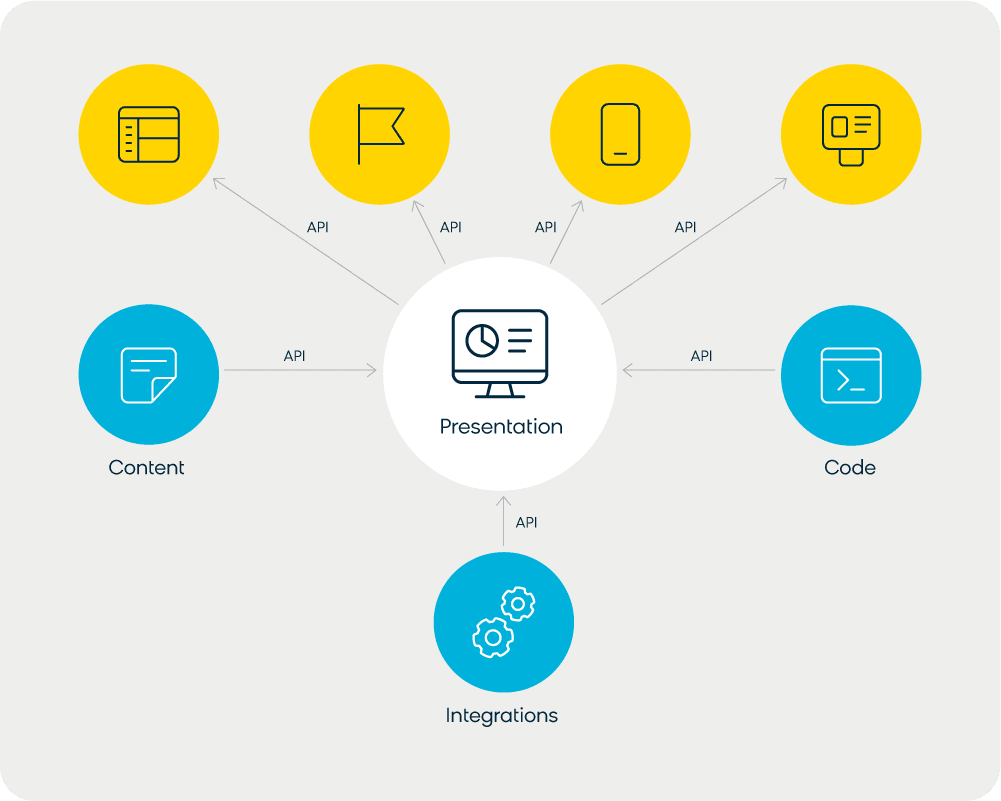
This API setup lets developers work quickly on the UI with no risk to business-critical back-end technologies.
Read this next: How headless CMS architecture powers modern SPAs
As more and more functionalities are built as modular services (a microservice architecture) that can be updated independently, it becomes easier to experiment with how they are displayed and used.
SPA frameworks and personalization tools are great for trialing these services to create engaging, dynamic, and even animated user experiences.
Plus, many people simply prefer developing in a certain programming language (many SPA frameworks use JavaScript) and thanks to APIs, the SPAs you build in one language can work seamlessly with back-end services developed in different languages.
Advantage #4: Enhanced User Experiences
The streamlined user experience of SPAs translates directly to business benefits. By eliminating page reloads and reducing loading times, SPAs can significantly improve conversion rates and reduce bounce rates. Users enjoy a more app-like experience that feels responsive and modern.
Single Page Applications vs Multi-Page Applications
Architecture Differences
The fundamental difference between SPAs and Multi-Page Applications (MPAs) lies in how they handle content delivery and user interactions. SPAs load a single HTML page and dynamically update content using JavaScript, while MPAs serve separate HTML pages for each route or section.
In an MPA setup, each user action that requires new content triggers a full page reload, with the server generating and sending complete HTML documents. This traditional approach means the server handles most of the rendering work, while SPAs shift this responsibility to the client’s browser.
The architectural distinction affects everything from initial load times to SEO capabilities, making the choice between SPA and MPA important for your project’s success.
When to Choose SPAs vs MPAs
Choose SPAs when:
- Building interactive applications with frequent user interactions (like dashboards, social media platforms, or web-based tools)
- User experience and speed are top priorities
- You have a skilled development team comfortable with JavaScript frameworks
- The application doesn’t require heavy SEO optimization
- You want to create a mobile app-like web experience
Choose MPAs when:
- SEO is critical for your business (like e-commerce product pages or content marketing sites)
- You have simpler content-focused websites
- Your team prefers traditional server-side technologies
- You need better initial page load performance
- Accessibility and web standards compliance are primary concerns
Many successful Bloomreach customer implementations use hybrid approaches, combining the benefits of both architectures. For example, using MPAs for SEO-critical pages like product listings while implementing SPA functionality for interactive features like shopping carts and user accounts.
SPA vs MPA: Quick Comparison
|
Single Page Application (SPA) |
Multi-Page Application (MPA)
|
|
|---|---|---|
|
How it loads |
Loads once, updates content via JavaScript |
Reloads full HTML for each navigation |
|
Initial load |
Slower (downloads full app bundle) |
Faster (loads only the current page) |
|
Post-load navigation |
Very fast — no server requests needed |
Slower — each page requires a server request |
|
SEO |
Requires additional configuration (SSR, pre-rendering) |
Naturally search-engine friendly |
|
User experience |
App-like, smooth transitions |
Traditional website feel |
|
Offline capability |
Can work offline with cached resources |
Requires server connection |
|
Development complexity |
Higher (routing, state management, SSR) |
Lower, more familiar patterns |
|
Best for |
Dashboards, email clients, interactive apps |
Content sites, blogs, e-commerce product pages |
SEO Considerations for Single Page Applications
Single page applications and SEO have a complicated relationship. SPAs deliver excellent user experiences, but their reliance on JavaScript to render content creates real challenges for search engine crawlers. Here’s what you need to know, and how to fix it.
Googlebot Rendering and Indexing Challenges
Since SPAs rely heavily on JavaScript to render content, search engine crawlers may struggle to index your pages properly. Googlebot has improved its JavaScript rendering capabilities significantly in recent years, but the process still differs from how it crawls standard HTML pages.
SPAs initially serve minimal HTML, loading the actual page content through JavaScript after the initial page load. This can result in search engines seeing empty or incomplete pages, especially on the first crawl.
Google processes JavaScript in two waves: first it fetches the initial HTML, then it queues the page for JavaScript rendering. This delay can slow your content from appearing in search results. Server-side rendering (SSR) or pre-rendering eliminates this delay by serving fully formed HTML from the start.
Server-Side Rendering, Pre-Rendering, and Client-Side Rendering
Server-Side Rendering (SSR) generates HTML on the server before sending it to the browser. Googlebot receives a fully formed page immediately, with no JavaScript rendering required. Frameworks like Next.js (React), Nuxt.js (Vue), and Angular Universal all support SSR. The tradeoff: SSR adds server load and complexity, as the server must generate HTML for each request.
Pre-rendering takes a different approach. A pre-rendering service (like Prerender.io or Gatsby for static sites) generates cached static HTML versions of your pages. When a crawler requests a page, it receives the cached HTML immediately. When a real user visits, they get the full JavaScript-powered SPA experience. Pre-rendering is often easier to implement than SSR and works well for content that doesn’t change in real time.
Client-Side Rendering (CSR) is the default SPA approach. Content renders in the browser using JavaScript. While this delivers the best user interactions and fastest subsequent page loads, it is the least SEO-friendly option without additional configuration.
Frameworks like Next.js and Nuxt.js let you mix approaches: SSR for SEO-critical pages, CSR for interactive features. This hybrid model is increasingly common among well-optimized SPA deployments.
URL Structure and Hash Routing
One of the most common technical SEO issues in SPAs is hash-based URL routing. Older SPA implementations update the hash fragment of the URL as users navigate (example.com/#/about, example.com/#/products). This works fine for users, but creates a serious indexing problem.
Google treats everything after the hash (#) as an anchor within the same page. From a crawler’s perspective, example.com/#/about and example.com/#/contact are both just example.com. All your SPA views collapse into a single URL, and Google can’t index them individually.
The fix is the HTML5 History API. Modern routing libraries (React Router, Vue Router, Angular Router) support History API routing by default. This produces clean URLs like example.com/about and example.com/contact that Google treats as distinct, indexable pages. If your SPA still uses hash-based routing, switching to History API routing is the single highest-impact SEO change you can make.
Crawlable Link Structure
SPAs often use JavaScript event handlers for navigation rather than standard HTML anchor tags. From a user’s perspective, both look identical. From a crawler’s perspective, they’re very different.
Googlebot can only follow links structured as <a> elements with valid href attributes pointing to real URLs:
“`html
Products “`
If your SPA uses onclick handlers or other JavaScript navigation for internal links, Googlebot may only ever see your homepage and miss every other page entirely. Use Google Search Console’s URL Inspection tool to check which pages Googlebot can actually access; it will show you the rendered HTML, including which links are visible to the crawler.
Managing Meta Tags for Each View
Traditional multi-page websites automatically serve unique meta titles, descriptions, and Open Graph tags for each page. SPAs serve a single HTML file, which means every view risks sharing identical metadata unless you handle it explicitly.
Duplicate meta titles across all views send weak signals to Google and hurt click-through rates in search results. Each distinct view in your SPA needs its own unique title and meta description.
Most SPA frameworks have libraries for this:
- React: react-helmet-async
- Vue: @vueuse/head or vue-meta
- Angular: The built-in Meta and Title services
For Open Graph tags (used by social platforms when links are shared), server-side rendering or pre-rendering is often the most reliable solution. Social media crawlers typically don’t execute JavaScript, so dynamically injected Open Graph tags are often invisible to them.
Analytics Tracking for SPAs
Standard Google Analytics counts sessions by detecting server responses. SPAs skip that server roundtrip for page-to-page navigation, so GA4 can miss pageviews unless you configure it to handle SPA routing.
The fix: enable GA4’s Enhanced Measurement and configure it to track browser History API events as pageviews. In your GA4 Data Stream settings, look for “Page changes based on browser history events” under Enhanced Measurement and enable it. If that still doesn’t capture views accurately, configure Google Tag Manager to fire a pageview trigger on History Change events.
This matters for SEO because accurate traffic data informs your optimization decisions. If GA4 is only logging the initial page load, you won’t see which SPA views are actually attracting visitors or where users are dropping off.
Core Web Vitals and SPA Performance
SPAs must carefully balance interactivity with Core Web Vitals performance metrics. While SPAs excel at reducing Cumulative Layout Shift (CLS) through consistent page structures, they can struggle with Largest Contentful Paint (LCP) if JavaScript bundles delay content rendering.
First Input Delay (FID) typically improves in SPAs due to their responsive, app-like interfaces, but initial JavaScript bundle sizes can negatively impact loading performance and search rankings.
Mobile is the critical factor. Google uses mobile-first indexing, meaning your SPA’s mobile performance directly affects desktop rankings. Techniques like code-splitting (loading JavaScript modules on demand instead of all at once), minifying JS files, and setting browser caching policies all reduce the load burden on mobile devices with slower processors and connections.
SPA SEO Checklist
Before launch: – [ ] Server-side rendering or pre-rendering configured for crawlable content – [ ] History API routing in place (no hash URLs) – [ ] Internal navigation uses <a href> tags, not JavaScript onclick events – [ ] Unique meta title and description configured per view – [ ] XML sitemap includes all routes and submitted to Google Search Console – [ ] GA4 Enhanced Measurement configured for SPA pageview tracking
Ongoing: – [ ] Regular URL Inspection checks in Google Search Console to verify indexing – [ ] Core Web Vitals monitored (especially LCP and CLS on mobile) – [ ] JavaScript bundle size audited periodically – [ ] Structured data/schema markup added to relevant views
Angular vs. React vs. Ember vs. Vue: Which Framework Works Best for SPAs?
Angular, React, and many others (such as Ember and Vue) are frameworks that developers use to create SPAs efficiently. Simply put, these frameworks are a collection of reusable components, contributed to by many developers, that follow a defined set of building rules.
If you equate building an SPA to building a house, you could mix up the clay, dry the bricks, and mine and mold the steel yourself. Or you could use the bricks and pipes other people have already designed and focus your time on what makes your house unique.
Routing Strategies in SPAs
Client-side routing is fundamental to SPA functionality, allowing navigation between different views without page reloads. Modern frameworks offer two primary routing approaches: hash-based routing (using URL fragments) and the History API (providing clean URLs).
Hash routing (example.com/#/page) is more compatible with older browsers but creates less user-friendly URLs and causes the indexing problems described in the SEO section above. History API routing (example.com/page) provides cleaner URLs but requires server configuration to handle direct URL access. For any SPA that needs search visibility, History API routing is the right choice.
Implementation typically involves route configuration, navigation guards for authentication, and lazy loading for performance optimization.
State Management Considerations
As SPAs grow in complexity, managing application state across components becomes increasingly challenging. Simple applications can rely on framework-built-in state management, while complex applications benefit from dedicated state management libraries like Redux (React), Vuex or Pinia (Vue), or NgRx (Angular).
Effective state management directly impacts performance and scalability, influencing how your application handles user interactions, API responses, and global application data.
A great thing about SPAs and the frameworks that support them is that, thanks to APIs and the right integrations, you can use whichever framework you prefer with your other API-enabled technologies.
3 Reasons Why Single Page Applications and Content Management Systems Are Historically a Difficult Pairing
When using SPAs, developers may think of the experience as an “app.” But a website visitor is still going to think of it as a webpage. And where there is a webpage, there is a marketing team itching to optimize it.
Because SPAs are apps that require development work to tinker with the display and delivery of the experience, marketers have to ask developers for help with every tweak they want to make, causing inevitable bottlenecks.
Reason #1: An Absence of Editing Tools That Marketers Understand
The usual editing features found in content management systems that marketing teams rely on, like live preview, drag-and-drop, and WYSIWYG editing, are usually tied to the delivery tier in a CMS.
But it gets tricky with SPAs. The delivery tier is determined by the SPA and the content is simply stored in the CMS in a standard way that the APIs can read. Because the SPA is rendered on the front end, the back-end CMS has no idea what it should look like and therefore can’t spin up a preview.
So CMS users end up getting stuck with a very dated approach: fill in a form, cross your fingers, push publish, and go see what it looks like live.
To return to our paint-by-numbers example, the CMS stores the raw content (the paint) and the SPA has the paint-by-numbers guide of how that content should look. The preview doesn’t have this guide, so it can’t figure out what the content should look like.
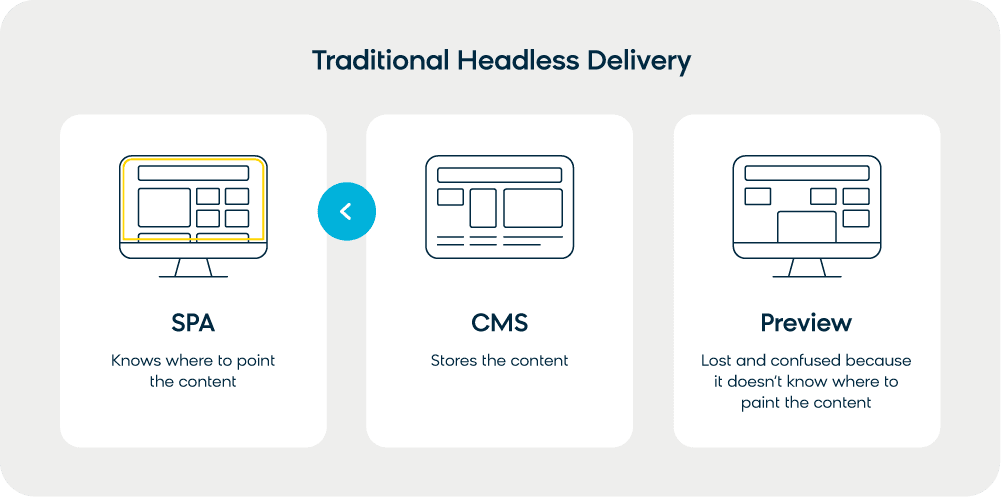
This is a pure “headless” delivery of content (it doesn’t have the CMS delivery tier as a “head”). It’s great for developing quickly, but is a bit rough for marketers who want to change the website on their own without having to code.
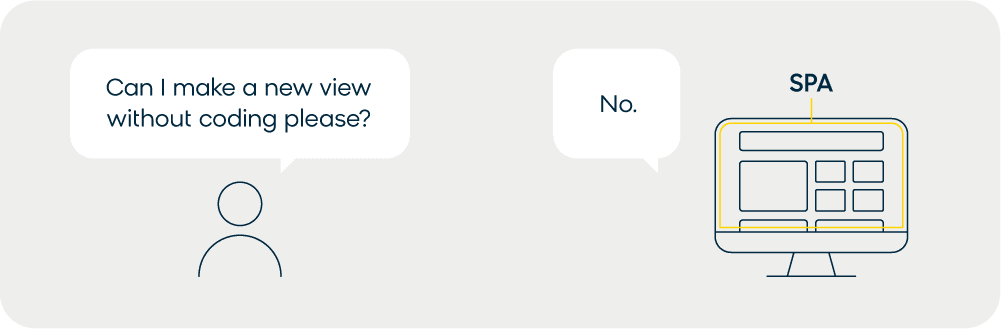
Additionally, marketers are used to thinking of site content in terms of “pages.” But because an SPA is a single page, the page-building and editing features marketers need aren’t available. If they want a new “page” (a “route” in an SPA), or want the view to look differently, they have to ask a developer to make those changes.
This issue arises from two core reasons: antiquated content management systems and SPA design.
First, there are certain content management systems where there simply isn’t a decoupling of how your content looks and how it’s stored. Because the storage of content is not in a standard, presentation-neutral format, the SPA can’t use it in the API-based way it wants to.
Reason #2: Difficulties in Reusing Content
This issue extends beyond SPAs, of course. This kind of CMS setup makes it impossible to reuse content across channels at all. Because the content is tied to how it’s displayed (a page-based system), the FAQs you put on your website can’t be tapped for someone to flip through on their smart watch; you’d have to store the same content in two different ways.
SPAs need a content-based CMS to work properly so that it can pull raw content and display it however it needs to be presented.
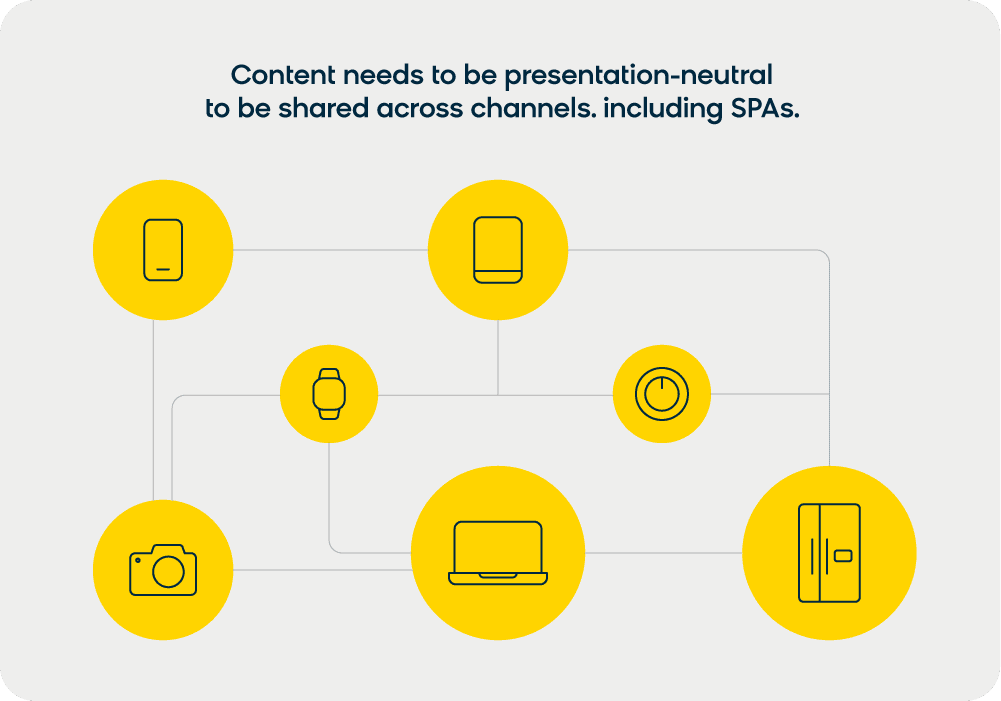
On the SPA side, the difficulty comes from the fact that many websites are now designed for a hybrid setup.
While you may want some parts as an SPA, you might want others set up in the traditional multi-page site format, which is often better for SEO. Despite the two different approaches, there needs to be a cohesive feel between these pages.
If your setup is two buckets of content (pieces for the traditional site and the SPA), that cohesion is going to break. You need content that works across both modes to present a seamless user experience.
Reason #3: Difficulties With Personalization and Relevance
There is an ever-increasing need for websites to provide personalized user experiences for users, especially for e-commerce businesses. Without the necessary architecture in place to handle a sophisticated level of personalization, SPAs can fall tragically short.
The problem is, personalization and relevance capabilities traditionally rely on complete page loads to render experiences. They require real-time customer data, and without the right CMS, SPAs can’t display content with that much context. This can be a problem when your goal is relevant and personalized content delivery.
On top of that, a number of content management systems implement personalization on the client side. Unfortunately, those JavaScript personalization rules don’t play very nicely on top of the SPA JavaScript.
Read this next: The Personalization Puzzle: Assembling the Pieces of Connected Commerce Experiences
Are Marketers Doomed in an SPA World?
Of course not. You simply need a CMS that has the right architecture in place for SPA use, one that is API-based and decouples content from presentation. And you need a system that can work with an SPA to provide editing tools and live previews, support a hybrid setup, and allow for personalization on the server side.
That’s exactly what Bloomreach Content offers. Our headless content management platform is built for commerce, giving you the tools to manage your site and optimize every user touchpoint through our powerful APIs.
Pairing our headless CMS with Bloomreach’s marketing automation takes personalization further, connecting your content management to a customer data platform with real-time segmentation and cross-channel campaign capabilities.
Want to learn more about how Bloomreach powers SPA-driven commerce experiences?
- How a CMS can work with SPA frameworks like Angular and React
- Personalization and hybrid SPA support with Bloomreach
Schedule a personalized demo with Bloomreach today to see our headless content platform in action.
Frequently Asked Questions
Does Google index single page applications?
Yes. Googlebot can render JavaScript and index SPA content, but it uses a two-wave process: first crawling the initial HTML, then queuing the page for JavaScript rendering. This creates an indexing delay that doesn’t exist with standard HTML pages. Using server-side rendering or pre-rendering eliminates this delay by giving Googlebot fully formed HTML on the first request.
Are SPAs good for SEO?
SPAs can rank well with proper technical SEO configuration. The common issues (JavaScript rendering delays, hash URL routing, duplicate meta tags, and analytics tracking) are all solvable. The challenge is that none of them happen automatically; each requires deliberate implementation. SPAs that don’t address these issues will typically underperform in organic search compared to equivalent content on server-rendered pages.
What is the difference between a single page application and a multi-page application?
An MPA serves a new HTML page from the server each time a user navigates to a new section. An SPA loads once and updates the page using JavaScript as users move between views. MPAs are easier to make SEO-friendly by default. SPAs deliver better user experiences but require additional configuration (server-side rendering, History API routing, and meta tag management) to achieve the same search visibility.
Which SPA framework is best for SEO?
All major frameworks (React, Angular, Vue) can be made SEO-friendly, but none are optimized for search out of the box. The more important factor is your rendering strategy. Next.js (React), Nuxt.js (Vue), and Angular Universal all support server-side rendering, giving you more control over what crawlers see. Choose a framework based on your team’s expertise, then configure rendering to support your SEO goals.
Can Bloomreach’s headless CMS work with any SPA framework?
Yes. Our headless content management platform is designed to be framework-agnostic; it delivers content as structured data via API, so your development team can integrate it with React, Vue, Angular, or any other SPA framework. We also offer SPA-specific capabilities like server-side preview and drag-and-drop editing that work regardless of your front-end framework.