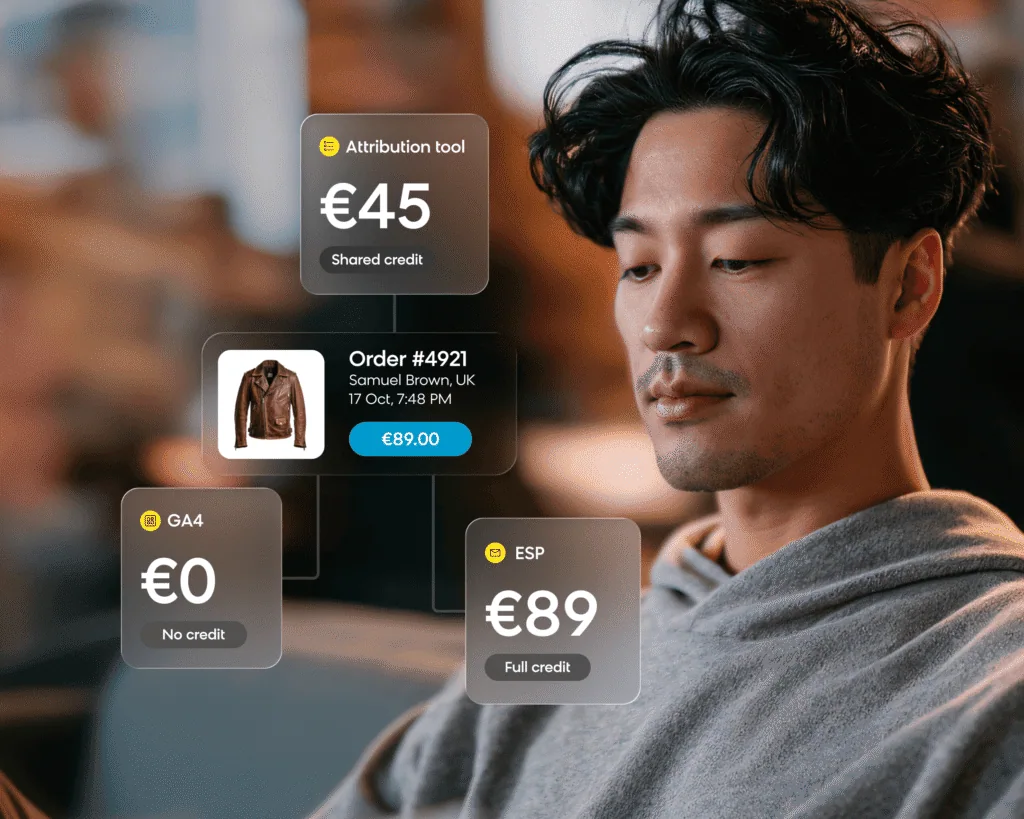
If you’ve ever compared what your email platform, GA4, and attribution tool each say that email sold last month, you’ve probably noticed that they don’t agree. And if you add up every channel’s claim, the total can easily come to more than finance actually booked.
That’s because email revenue attribution is really about connecting two facts: a customer interacted with an email, and they later bought something. This stat has to account for which interaction qualifies, how long it stays eligible, and who wins when another channel touched the same customer. Each system in your stack applies its own version of that rule to the same orders, so each one reports a different figure, and each figure is useful for a different decision.
In this post, we’ll walk through how each type of tool counts email revenue, how to reconcile the three numbers, and which one to use when.
Why Do Your ESP, GA4, and Attribution Tool Report Different Email Revenue?
These tools don’t always line up because each system counts a different kind of conversion, over its own window, and using its own view of the order. An email platform credits orders from customers it messaged and matched on its own customer profile, usually within hours or days of a qualifying open or click. GA4, on the other hand, credits the traffic source of the session in which the order happened, so it only counts email when a click arrives tagged as email. Finally, a multi-touch attribution tool pulls orders from the store and touchpoints from every paid and owned channel it connects to, then splits the credit using its own model.

None of these is wrong, so what you really need to do is use each number for the decision it was built to inform. However, keep in mind that all three measure credit rather than cause. They assign orders to email by rule, and only a holdout group that receives no email can show you which of those orders would have happened anyway.
How Each System Counts an Email-Driven Order
There are six mechanics that separate the three systems. Let’s see where exactly they differ.
What an Email Platform Counts
An email platform knows exactly who received which message. It credits an order to a message when the buyer matches a profile it sent to and the order falls inside the window after a qualifying interaction. What counts as qualifying is up to the account: an open, a click, and in some setups, a delivery.
Which of those you choose has a big effect on the figure, mainly because Apple Mail preloads images on delivery whether or not anyone reads the message. That inflates opens for any mailbox read in Apple Mail, including Gmail and Yahoo accounts, which is why our Apple Mail Privacy Protection guidance recommends clicks as the main engagement metric. To put the difference in perspective, across Bloomreach customers from April to June 2026, the average unique open rate was 40.4%, while the average unique click rate was 1.9%. So, under an open-based rule, a large share of your list is eligible for credit, but under a click-based rule, only a small share is.
The email platform also usually sees only its own channels. The paid search ad or affiliate link a customer clicked after the email is typically invisible to it, so nothing takes the credit away. That’s why its figure tends to be the largest of the three.
What Web Analytics Counts
GA4 attributes a key event, such as a purchase, to the channels that brought the sessions leading up to it. Its attribution reports offer a data-driven model and a last-click model. It also excludes direct visits from credit unless the whole path was direct, and it can reattribute a conversion for up to seven days after it happens.
There are three reasons why its email figure tends to come in low:
- Untagged clicks: It can only count an email click that arrives tagged, so untagged clicks from mail apps tend to land as direct or referral traffic.
- Sessions it can’t see: It only sees the sessions it can observe, which depends on cookies, consent, and whether the purchase event fired in the browser.
- Later channels: It counts every channel that brought a session, so under last click, a paid search click after the email takes the credit.
That said, GA4 holds every channel it sees as a session to one definition, and that consistency is what makes it useful. It just isn’t an email-specific measure.
What a Multi-Touch Attribution Tool Counts
A multi-touch attribution tool typically ingests orders from the store or warehouse, along with touchpoints from ad platforms, analytics, and messaging tools. It then stitches them to one customer and splits each order’s credit across the touches using its model. Depending on the tool, that model might be a fixed rule such as linear or position-based, a data-driven model, or one calibrated with incrementality tests.
Its email figure depends on how much weight the model gives an email touch compared with the paid touches around it, and it can restate past periods as new touch data comes in. Where it really adds value is scope: It can weigh touches that never became a site visit, such as an email open or an ad view, against everything else on one model.
The 6 Mechanics Side by Side
| Mechanic | Email platform | Web analytics (GA4) | Multi-touch attribution tool |
|---|---|---|---|
| What counts as an email touch | An open, a click, or, in some setups, a delivery, set by the account | A session that began from a click tagged as email | Any email interaction the tool ingests, weighted by its model |
| How long the credit lasts | A window after the touch, usually hours to days, set per channel | The paths inside the property’s lookback window | The tool’s own lookback, set by the tool |
| Who the order is matched to | The customer profile it messaged | A browser, device or signed-in user | A customer stitched across channels |
| Which channels compete for credit | Usually only its own channels | Every channel that brings a session | Every channel it connects to, paid and owned |
| Where it sees the order | Store integration or purchase event | Purchase event on the site | Store or warehouse order feed |
| Why last month’s figure can change | Late interactions inside the window | Reattribution for up to seven days | New touch data or a retrained model |
| Where it’s a good fit | Deciding what to send | The cross-channel view leadership sees | Deciding where budget goes |
Example: How 1 Order Gets Counted 3 Ways
Here’s how that plays out with a single order. Let’s say a customer opens a Tuesday newsletter without clicking. On Thursday, they search for the product, click a paid search ad, and browse. Then on Friday, they come back directly and buy.
- The email platform, on an open-based rule with a window of several days, credits the whole order to the newsletter. On a click-based rule, it credits nothing, because nobody clicked.
- GA4 gives no credit to the direct visit and, under last click, credits the order to paid search. Email doesn’t appear at all, because the open never produced a session.
- A multi-touch attribution tool that ingests the open splits the order between the newsletter and the ad, based on its model.
Finance only sees one order, but if you add the email platform’s open-based claim to the paid search report, you count it twice, and that’s how channel totals end up exceeding what the store actually sold.
How To Reconcile the 3 Numbers in 5 Steps
You might expect matching date ranges to close the gap, but it won’t, because the systems disagree on what an attributed order is in the first place. Instead, pick one month, pull a sample of orders by order ID, and trace each one through all three systems using the steps below. Before you start, agree on a tolerance with your finance team so you know when the numbers are close enough.
- Qualifying touch. Write down what each system accepts as an email touch. On the same window, an open-based rule reports more than a click-based one, and a delivery-based rule reports more again. Clicks are the more defensible baseline, so we’d recommend comparing on a click rule first. If you have long purchase cycles, though, keep the open-based figure as a second line rather than dropping it.
- Window. Write down each window and what starts it. Don’t assume a longer window is more accurate. On a daily send cadence, a window longer than the gap between sends moves credit from one campaign to the next, and it can also change last month’s report after you’ve presented it.
- Purchase definition. Decide whether an order counts when it’s created, paid, or fulfilled. You’ll also want to decide whether revenue is gross or net, and whether returns and cancellations are in or out. Then, align every system to the definition finance uses.
- Deduplication. Check whether one order can be claimed by two campaigns, or by a campaign and another channel. If your channel totals add up to more than the store sold, several systems are crediting the same orders, so pick one system as the reference for each comparison.
- Residual gap. Even once the four rules above are aligned, consent coverage, identity matching, and untagged links will leave some difference. When you get there, document the cause, check it against your tolerance, and stop reconciling.
Which Number To Use for Which Decision
Each of the three numbers is better suited to one decision than the other two. Whichever one you present, it’s a good idea to write the rule under the figure so everyone reading it knows what it counts.
- Deciding what to send, to whom, and how often: Use the email platform. It’s measured per message and per customer who received it, which is the same unit the sending decision is made in. Use it to compare campaigns, flows, and frequency policies against each other on a fixed rule.
- Deciding where the next dollar of budget goes: Use the attribution tool. It’s built to weigh email against paid media, including touches that never became a site visit. Use it for channel mix and budget moves, but expect it to restate.
- Reporting channel share to leadership: Use GA4. Because it holds every channel it sees to one definition, the trend in email’s share stays comparable quarter to quarter, as long as the settings don’t change. Use it for that trend, with the attribution rule written under the figure.
If you’re moving the team from opens to clicks, you can keep open rate on the chart as a trend line so the switch doesn’t read as a drop in performance. For the metric definitions behind each figure, see our email marketing analytics guide, and for the click-to-order step by industry, see our email conversion rate benchmarks.
How To Test Whether Email Actually Drove Revenue
To find out whether email actually caused the revenue, you need a holdout. This is a random share of customers who receive nothing and stay in that group for the length of the test. You then compare revenue per customer between the two groups, measured from the day of assignment rather than from a click. The group that receives nothing is key, because it shows what those customers would have bought anyway. You don’t need special software to get started, either: just export the list, split it at random, and add the holdout group to a suppression list for the test period.
You can use the same design to test a change to how you send. For example, River Island ran a two-phase A/B test with Bloomreach for at least three weeks on a frequency policy. The policy split its newsletter audience into eight categories based on historic engagement, each with its own send limit. In the second phase, River Island added campaign prioritization, so a customer who qualified for several campaigns received only one email in a set period.
Because this was a frequency test, success meant sending less without losing revenue per customer. Total send volume fell 22.5%, yet revenue per email rose 30.9% and orders per email rose 30.7%. Meanwhile, the open rate rose 26% and unsubscribes fell 12.8%.

If you’re judging the send decision, the per-email figures show that each message became far more productive. If you’re looking at the business outcome, revenue per customer shows that the same customers spent the same amount with fewer emails, and fewer of them left the list. Bear in mind, both groups still received email, so the test measures the sending policy rather than email itself. To measure email itself, you need a no-email holdout: fix the share of the list you hold out, choose the metric before the test starts, and run it long enough to cover several purchase cycles. Our guide to email A/B testing covers how to split and size the groups.
What To Look for in an Email Attribution Tool
Whichever tool you’re evaluating, we’d suggest asking three questions about its attribution:
- Can you see the rule?
- Can you change it?
- Does it stay put once it’s set?
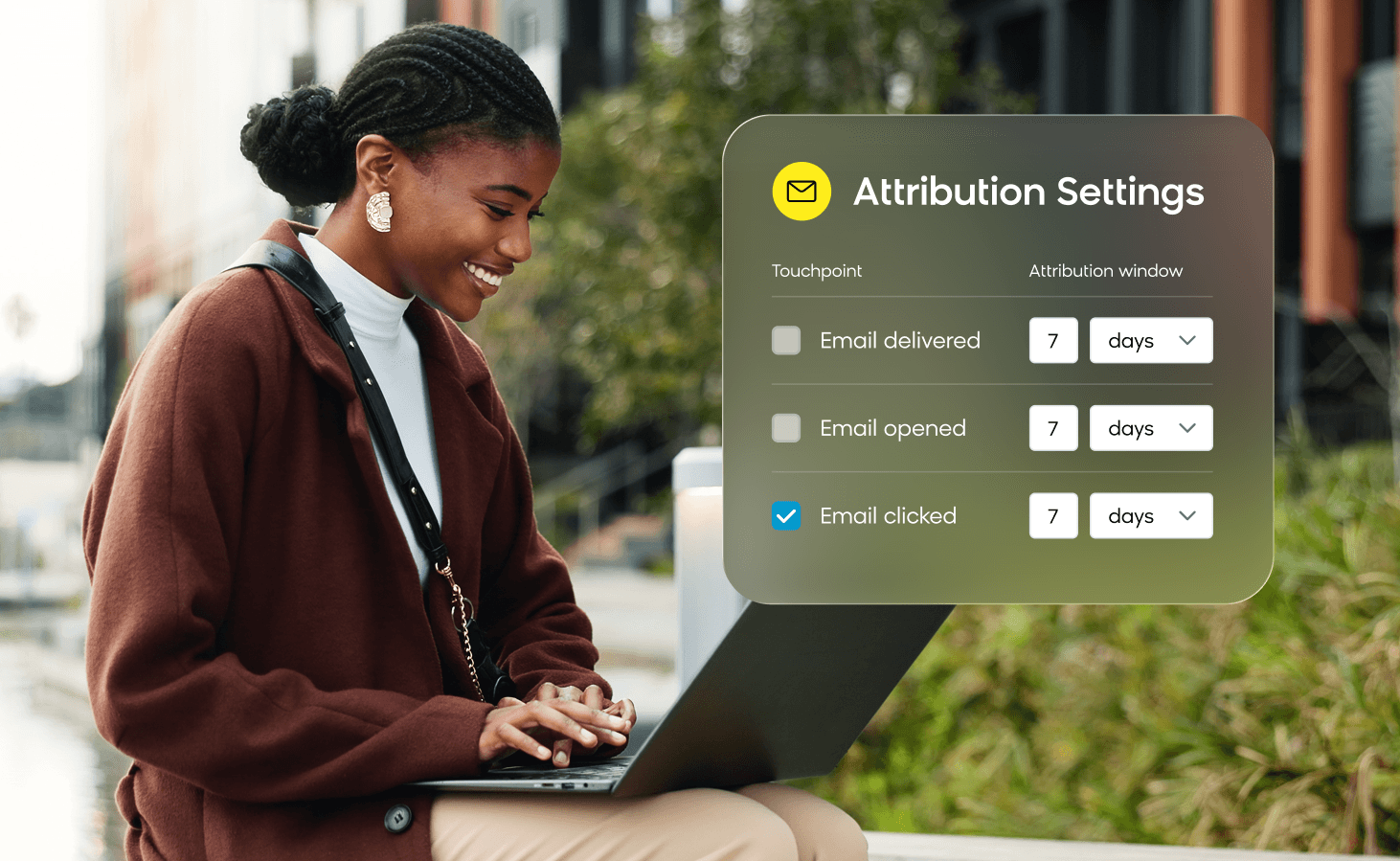
In Bloomreach, every touchpoint is made up of a channel, a status (delivered, opened, clicked, or viewed), and a window, and revenue goes to the last valid touchpoint before the purchase. For example, if a customer clicks an email, then an SMS, then a web banner, and buys inside the banner’s two-hour window, the banner gets the credit. If you remove the banner from the settings, the credit falls back to the email click. You can also use data filters to keep some messages out on purpose. For instance, naming every transactional message with a “[transactional]” prefix stops an order confirmation from claiming the next purchase. On top of that, data cleaning removes flagged bot clicks and Apple Mail Privacy Protection opens from the attribution in the performance dashboards.
If your email revenue lives in three systems that disagree, see how Bloomreach’s marketing app sets the attribution rule per channel. You’ll see the touch, the window, and the filters behind every figure, along with the per-customer revenue you can build your next segment on.
Frequently Asked Questions About Email Revenue Attribution
Why is my platform’s email revenue higher than GA4’s?
Your email platform credits any order from a customer it messaged within its window after a qualifying open or click, and it usually can’t see the ads or links they clicked afterwards. GA4, by contrast, credits the source of the session that led to the purchase, only counts email from tagged clicks, and lets any later channel take the credit. If you switch the platform’s rule to clicks and align the window and purchase definition, the gap narrows to what consent and identity matching leave behind.
What attribution window should I use for email?
If you send often, keep it shorter than the gap between sends. A longer window lets credit slide from one campaign to the next and makes past reports move. Otherwise, match the window to how quickly your customers buy: a day or two for frequent sends in impulse categories, and longer for considered purchases you send weekly. Whatever you choose, keep the same window whenever you compare periods.
Can two channels claim the same order?
Yes. Most systems only deduplicate within their own view, so an email platform and an SMS tool, or a campaign report and a channel dashboard, can each claim the same order. That’s why you should decide which system is the reference for each decision, and only compare channels inside one system.
Is attributed email revenue the same as incremental revenue?
No. Attributed revenue is what a rule credited to email, while incremental revenue is what wouldn’t have happened without it. A holdout group that received nothing is the most direct way to measure the second. We suggest presenting the attributed figure as the operating number and the holdout result as the proof.
Should I move all my email reporting into GA4 or a BI tool?
Keep both, because they do different jobs. The email platform is for what you act on this week: which customers, segments, and sends. GA4 and BI, on the other hand, hold the cross-channel and finance view. To connect the two, export the email platform’s raw events to your warehouse so you can reconcile them order by order.